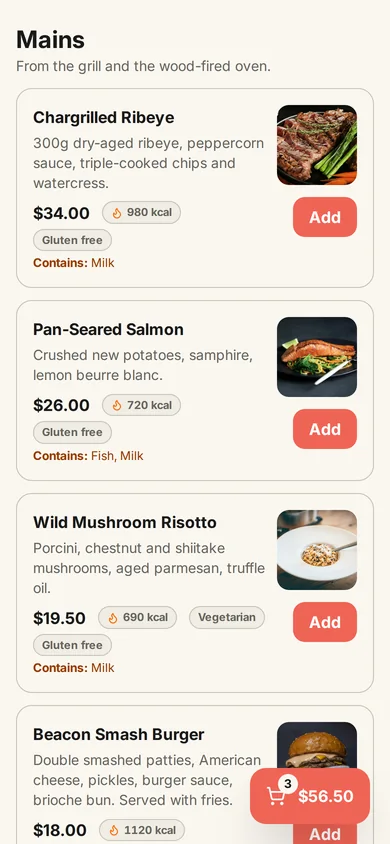
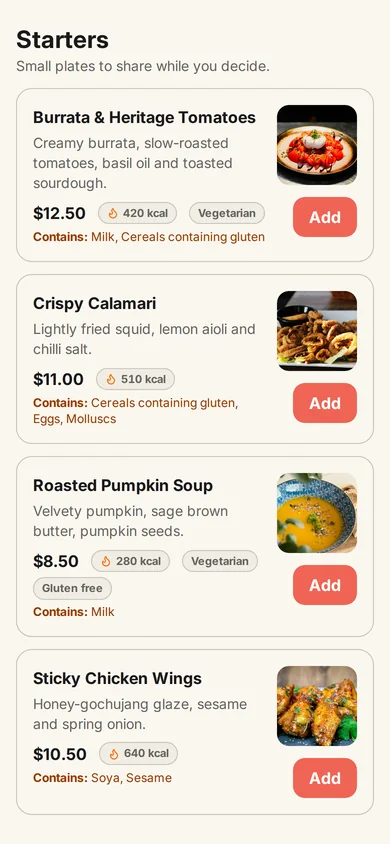
Guests order from the table
They scan the QR code and see your dishes with photos, prices and allergens. No app and no account.
For restaurants, cafés, bars and takeaways
Guests scan the code on the table, order and ask for the bill from their phone. Every order shows on your kitchen screen. No app to download, no commission, no card needed to start.
Rather not build it yourself? Send us your menu and we set it up free in 48 hours.

 Scan to try itOur demo menu, on your phone.
New order · Table 71 × Burrata & Heritage Tomatoes1 × Beacon Smash Burger
See it working
A real order in the MenuBeacon demo restaurant, recorded on the guest's phone and the kitchen screen at the same time. Then open the same menu on your own phone and place one yourself.
They scan the QR code and see your dishes with photos, prices and allergens. No app and no account.
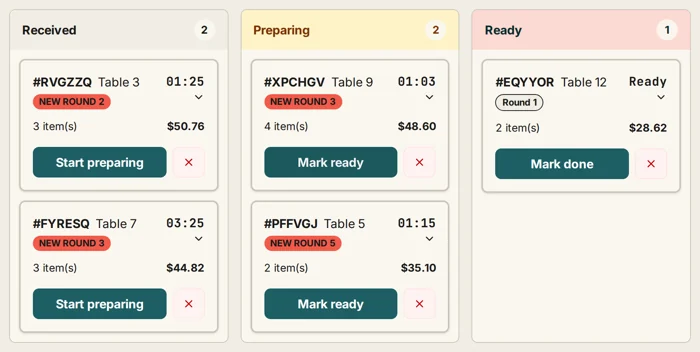
Each order arrives on the kitchen screen with its table number. One tap moves it from received to preparing to ready.
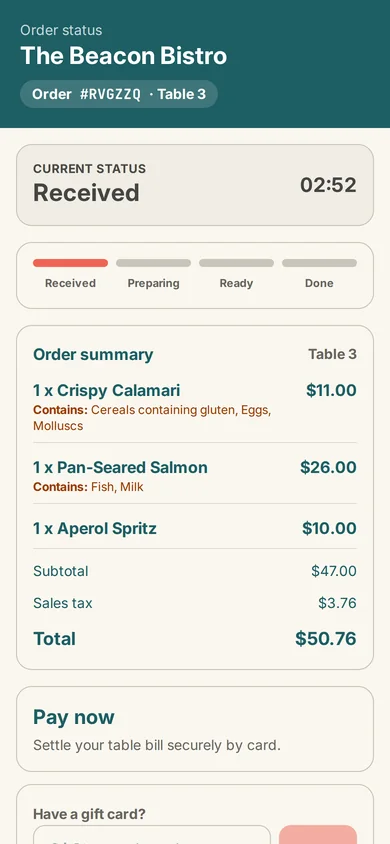
They watch the order status on their phone. Cash or pay at the counter on Free, card from the phone on Pro.
Order from the demo menu Open the owner dashboard demo
The demo is a shared example restaurant. Payments in it are simulated and its data resets every few hours.
You run a restaurant, not a software project. Send what you already have and we do the typing.
48 hours from when we receive a menu we can read. Setup is free on every plan and you stay on Free unless you choose Pro. QR cards are sent as a print-ready PDF.
The platform
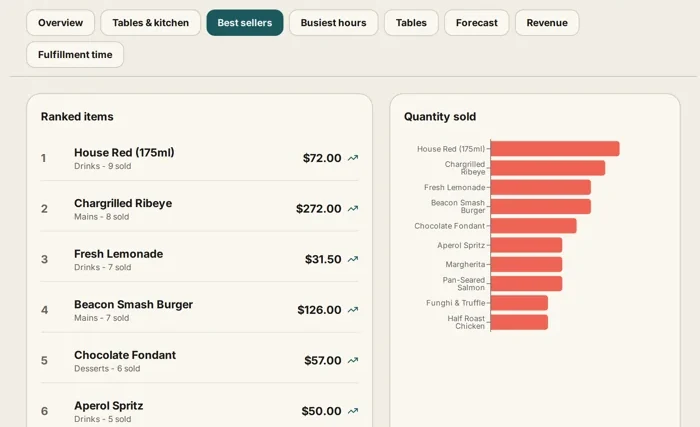
Start with a digital menu, add table ordering, or bring orders onto the kitchen screen. You run it from any browser: a laptop at the counter, a tablet in the kitchen, your own phone.
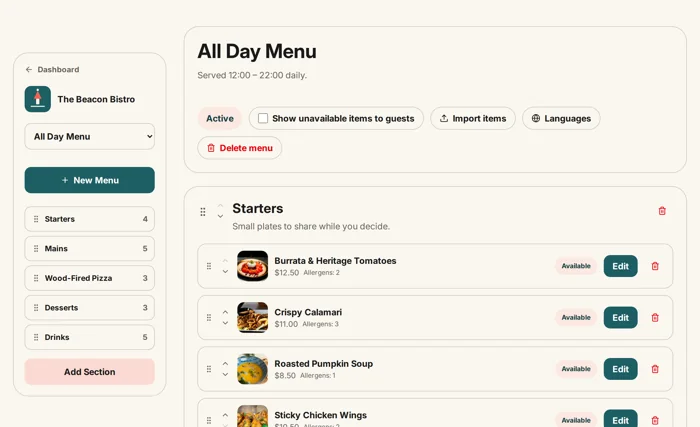
Change a price, photo, dish or availability without replacing a printed QR code.
Guests order from the menu on their phone while staff help with questions and service.
Live orders move through the kitchen on a screen, with no handwritten tickets to copy.
Card, Apple Pay and Google Pay at the table, with tips and split bills, on Pro.
Pickup and delivery orders from a link to your own menu, on Pro.
A menu photo or PDF becomes a draft you check before importing it, on Pro.
Built around service style
Full table service, counter service, room service or several locations: the same platform, set up for the way you serve.

Table service, kitchen flow, payment and repeat visits.

Breakfast, lunch, takeaway and a busy counter.

Repeat rounds and changing drinks menus.

A short route from choosing to the kitchen queue.

A current menu and ordering in rooms and guest areas.

Live availability without a fixed counter menu.

Sales and performance across your locations.
Currency, payments, tax and billing in the US, UK, EU and Pakistan editions.
Transparent pricing
Free includes digital menus, table ordering, cash or pay-at-counter orders, and the kitchen dashboard. Pro is $20 a month and adds payments at the table, online ordering, loyalty, staff accounts, integrations, and higher limits.
$0 /forever
A complete QR menu with table ordering, a live kitchen dashboard, and cash or pay-at-counter orders. No credit card, no time limit.
$20 /month
Everything in Free, plus payments at the table, online ordering, loyalty, reservations, and staff accounts. One monthly subscription, no MenuBeacon commission.
30-day money-back guarantee on ProIf Pro is not right for your restaurant, email us within 30 days of your first payment and we refund it. Free keeps working either way.
Free does not expire. No MenuBeacon commission. Compare every feature and limit →
Availability: Pay at table, loyalty, and reservations are Pro features in the US, UK, and EU editions, with card payments through Stripe (standard Stripe fees apply). The Pakistan edition has its own Pro plan at Rs 5,000 a month, billed in PKR, and guests pay cash or at the counter. Zuzu is in early access for Pro. Country editions →
Ask how service went or have a menu change drafted for you to confirm. It is being switched on in stages and is off in the public demo. See what Zuzu can do →
Questions before the first table
No. They scan the QR code with their phone camera and the menu opens in the browser.
Yes. Ordinary menu edits publish through the same printed table QR codes; deleting or deliberately rotating a code is a separate action.
3 menus with unlimited items, 20 table QR codes, 5,000 scans/month, item photos, your branding, table ordering, a live kitchen dashboard, and cash or pay-at-counter orders — free forever.
Card and wallet payments at the table, online ordering for pickup and delivery, loyalty & gift cards, reservations, staff accounts with PINs, multi-location, AI menu import, integrations, white-label, and early access to Zuzu. $20/month, no commission, cancel anytime.
Yes, on Pro in the US, UK, and EU editions. The restaurant connects its own Stripe account for card payments, tips, and equal bill splitting; standard Stripe fees apply. Apple Pay and Google Pay show up when the guest’s device and browser allow them. On Free, and in the Pakistan edition, guests order from the table and pay cash or at the counter.
Yes. Open the live demo from the “Live demo” link at the top of this site: it signs you straight into a fully set-up demo restaurant with menus, table QR codes, live orders, reservations, and analytics. It is shared with other visitors and resets every few hours, and guest payments in it are simulated, so nothing you do there is billed or sent anywhere.
Zuzu is MenuBeacon’s restricted restaurant AI assistant. It can answer operational questions and use allowlisted MenuBeacon tools within the signed-in restaurant’s permissions. Zuzu is in early access for Pro restaurants and is being switched on in stages. It is turned off in the shared public demo.
Yes, on every plan. Set your logo, colors, and cover image so guests see a menu that looks like your restaurant — not a generic template.
Yes, free of charge on every plan. Email a photo or PDF of your menu to support@menubeacon.com, or write to us through the contact page and attach it to our reply. Within 48 hours of receiving a menu we can read, we build your digital menu, send it to you to check, and send printable QR cards for your tables as a PDF. Please check prices, allergens, and dietary details yourself before you publish: you know your kitchen, we only see the menu.
MenuBeacon runs alongside your till; it does not replace it or sync with it. Orders, the kitchen board, and payments work on their own in MenuBeacon. On Pro, signed webhooks can send order events to other systems. There is no POS connection at the moment.
Yes. Free costs nothing and never expires. If you upgrade to Pro and it is not right for your restaurant, email support@menubeacon.com within 30 days of your first Pro payment and we refund it.
Add your dishes, print a table QR code, and send a test order to the kitchen. Start on Free, with no credit card required, or send us your menu and we set it up for you.
Start freeWant to look around first? Open the live demo — a sample restaurant, no sign-up needed.
Free forever · Pro $20/mo with a 30-day money-back guarantee · No commission
Ask me anything about MenuBeacon
Zuzu is an AI assistant and can make mistakes. Chats are saved for 12 months and may be read by our team, so don't type payment or personal details in your messages. Privacy