Features
Menus, orders, and kitchen updates in one place
Give guests a menu they can order from, send confirmed orders to the kitchen, and track service from your dashboard. Add payments at the table, online ordering, loyalty, and more on Pro. Guests need no app; staff use a browser on compatible devices.
Menus
A menu you can change without another print run
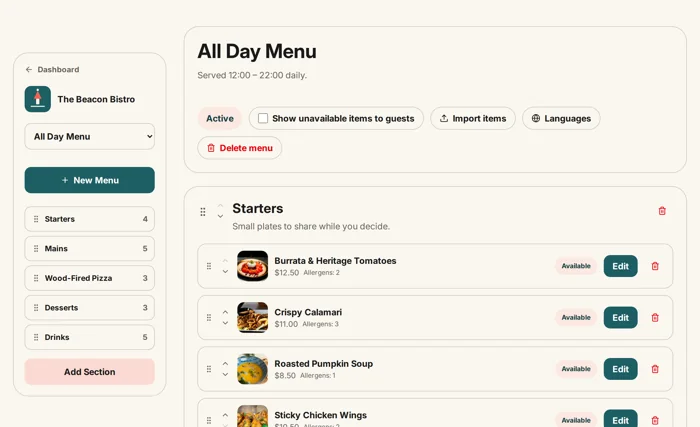
Build digital menus with sections, photos, allergens, dietary tags, modifiers, and pairings. Ordinary menu edits appear through the same table QR codes.
- Drag-and-drop menu builder with photos and modifiers
- Schedule lunch, dinner, and happy-hour menus automatically
- AI menu import from a photo or PDF, plus a separate CSV import (Pro)
- Dietary filters and restaurant-supplied allergen information
Ordering & payments
Ordering and payment from the table
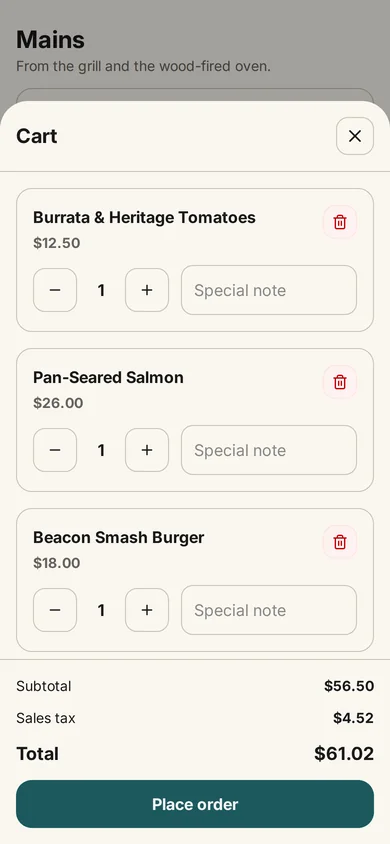
From the same QR code, guests add items, choose modifiers, and send an order. On Pro, they can pay by card, Apple Pay, or Google Pay through the restaurant’s own Stripe account, add a tip, and split the bill evenly.
- Order from the phone browser with zero downloads
- Card, Apple Pay, and Google Pay through your own Stripe account (Pro)
- Tips and equal bill splitting at the table (Pro)
- Diner accounts with one-tap reorder of last order
Kitchen & floor
Keep kitchen orders and service requests in view
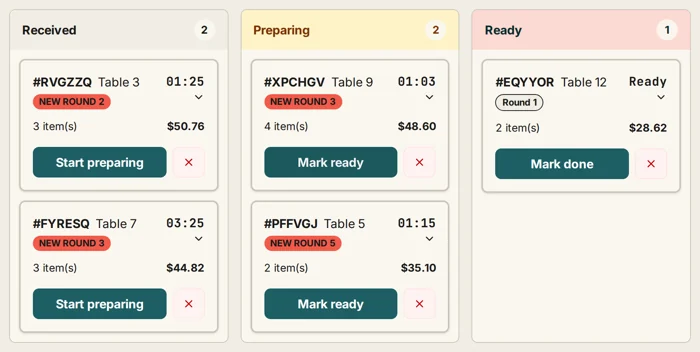
Confirmed orders appear on a live kitchen dashboard. Your team moves tickets through service while waiter calls and bill requests appear alongside them.
- Live kitchen board with order statuses
- Waiter call and bill request buttons on every menu
- Staff accounts with PIN logins for your team (Pro)
- Manage multiple locations from one account (Pro)
Growth & insights
Know what works, and bring guests back
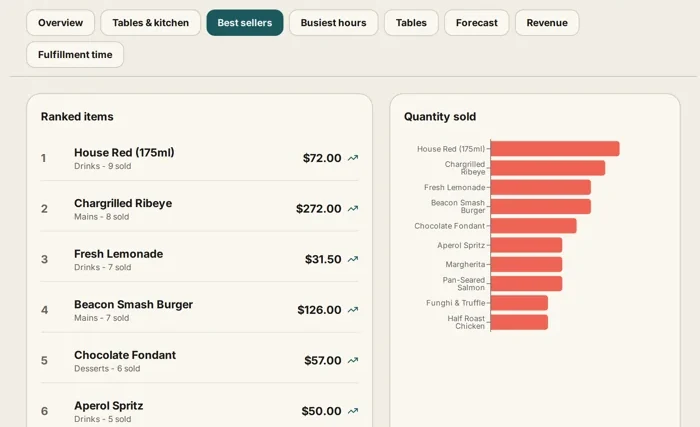
Review scans, busy periods, table activity, orders, and item feedback. Pro adds loyalty stamp cards, promo codes, and guest history.
- Scan and order analytics with heatmaps and forecasts
- Digital loyalty stamp cards that reward regulars (Pro)
- Promo codes and a guest CRM with order history (Pro)
- Guest feedback on every dish
And there is more
More tools for day-to-day service
Explore tools for reservations, printing, staff access, and more. Each product page explains the plan and setup you need.
Custom QR designer
Branded QR codes with colors, logos, and styles.
Gift cards
Sell digital gift cards straight from your menu.
Reservations
Guests request a table from the menu page.
Your branding
Logo, colors, and cover image on every menu.
Google reviews
One-tap review button for happy guests.
Webhooks & public menu API
Receive signed restaurant events and read supported public menu data.
Embeddable widget
Drop your live menu into your own website.
Weekly digest
A Monday email with your week in numbers.
Multi-language menus
Guests switch languages on their phone.
Receipt printing
Print kitchen tickets and guest receipts on any plan.
Waiter call & bill request
Guests ask for service or the bill from the menu.
Staff PINs & 2FA
Role-based PIN logins for your team on Pro.
A shorter path to ordering
Guests can browse and send an order when ready instead of waiting to place it verbally. Your team controls order acceptance and preparation.
See service requests in one place
Orders, waiter calls, and bill requests appear in the restaurant dashboard so staff can acknowledge and manage them.
See which dishes get attention
Review scans, busy periods, table activity, item feedback, and orders; Pro can add configured email reports.
Feature questions
What is included in a MenuBeacon digital menu?
Sections, items, prices, photos, descriptions, allergens, dietary tags, modifiers, pairings, scheduled menus, multi-language translations, and your branding — all editable from one dashboard.
Which features need the Pro plan?
Card payments at the table, online ordering for pickup and delivery, loyalty stamp cards and gift cards, reservations, guest CRM, staff accounts with PINs, multi-location groups, AI menu import from a photo or PDF, CSV menu import, webhooks, the public menu API, widget embeds, advanced analytics, removing the MenuBeacon branding, and early access to Zuzu are on Pro ($20/month). Menus, photos, branding, table ordering, the kitchen dashboard, and cash orders are free. Pay at table, loyalty, and reservations are available in the US, UK, and EU editions.
Can MenuBeacon replace my POS?
MenuBeacon runs menus, ordering, payment, and kitchen status, but it does not claim full two-way POS replacement or synchronization. Supported webhooks can send restaurant events to other systems. MenuBeacon does not sync orders or menus with a POS.
Does it work for cafés, bars, and food trucks?
Yes. Any venue where guests can scan a code works: restaurants, cafés, bars, hotels, food halls, and food trucks.
Give every table a menu they can order from.
Add your dishes, print your table QR codes, and try an order. The Free plan does not expire, and no credit card is required.
Start freeWant to look around first? Open the live demo — a sample restaurant, no sign-up needed.
Free forever · Pro $20/mo with a 30-day money-back guarantee · No commission