Built for your venue
A nail price list clients scan, and you change in seconds
Put your manicures, pedicures, gel and BIAB, extensions, nail art, and add-ons on one branded price list with photos of your work. Clients scan a QR code at the window, the desk, or the station, and you update it from your phone without reprinting.
The price list, photos, branding, and QR codes are on Free. For appointments, keep your current booking app: MenuBeacon has no technician calendar.

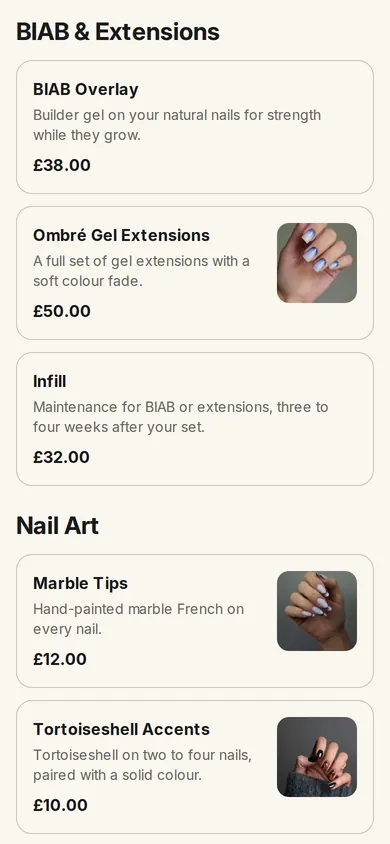
Services in clear sections
Group manicures, pedicures, gel and BIAB, extensions, nail art, and add-ons, each with a price and a short description.
Photos of your work
Add a photo to each service or design, so a client can point at the look they want before they sit down.
Your brand on every scan
Your logo and colors on the price list, and styled QR codes for the window, the desk, and each station.
The challenge
A printed price list is out of date the day you change a price
A new gel range, a seasonal design, a service nobody can do today: each change means a reprint, a sticker over the old price, or a client asking at the desk. Photos of your best sets sit on a phone or on Instagram, not next to the price.
What changes
One live price list, everywhere a client looks
Clients scan with their phone camera and see your current services, prices, descriptions, and photos of finished nails, with no app to install. You edit the list from the dashboard, and the printed QR code keeps opening the latest version.
How it works
From a printed price list to a live one
Build it yourself in an afternoon, or send us the list you already have and we build it for you.
-
1
Send or build your list
Upload a photo or PDF of your current price list and we build it free within 48 hours, or add your sections and services yourself.
-
2
Add photos and extras
Attach photos of finished sets, and list extras such as removal, French tips, or nail art in an add-ons section, each with its own price.
-
3
Place the QR codes
Print the QR code for the window, the reception desk, and each station, and share the same link on your social profiles.
-
4
Update whenever you need
Change a price, hide a service for the day, or add a new design; the same QR code shows the change straight away.
Built for a service menu
Everything a client needs to choose, without asking at the desk.
- Sections, prices, descriptions, and photos
- Translations you enter, for clients who read another language
- Ordering switched off, so the list is browse-only
What it does not do
Plan around these from day one; your booking app keeps doing its job.
- No appointment calendar or technician scheduling
- No client records or treatment notes
- No deposits or payment for appointments
Serve coffee or prosecco at the station?
- A drinks menu with ordering on. Keep the price list browse-only and turn ordering on for a separate drinks menu. Table ordering is on Free.
- Station QR codes. Name a QR code after each station or pedicure chair, for example Station 3, so a drink order arrives with the right label.
- Orders on a screen. Drink orders appear on the browser-based order board with a sound alert, on any tablet or computer you already have.
- Alcohol stays with your staff. Items can carry an age-restriction prompt, but your team still checks ID and follows your licence.
Good fit for
Use it where it removes a real handoff
- Nail bars and salons replacing a printed or laminated price list
- Salons that post their designs on Instagram and want them next to the price
- Nail bars that serve drinks while clients wait
Straight answers
MenuBeacon for Nail Bars & Salons questions
Can I use MenuBeacon for a nail salon rather than a restaurant?
Yes. A menu in MenuBeacon is a list of sections, items, prices, descriptions, and photos, so it works as a service price list. Some dashboard wording is written for restaurants (tables, kitchen), and food fields such as allergens and calories can stay empty.
Can clients book an appointment through it?
No. MenuBeacon has no appointment calendar or technician scheduling, and its reservation feature is built for restaurant tables. Keep your current booking app for appointments and use MenuBeacon for the price list.
Can clients order services from the price list?
Only if you want them to. Ordering can be switched off for a menu, so the price list is browse-only. If you serve drinks, you can turn ordering on for a separate drinks menu.
Do clients need to download an app?
No. They scan the QR code with their phone camera and the price list opens in the browser.
What does it cost?
The price list, photos, branding, and QR codes are on the Free plan, which costs nothing. Pro ($20/month, billed in USD) adds features such as online payments and staff accounts, which most salons do not need to start.
Will you set up my price list for me?
Yes, free. Upload a photo or PDF of your price list on the Send your menu page. Within 48 hours of receiving a list we can read, we build it and send it to you to check before you publish.
Put your price list on a QR code this week
Start free and build it yourself, or send us the price list you have now and we set it up within 48 hours.
Start freeWant to look around first? Open the live demo — a sample restaurant, no sign-up needed.
Free plan available · No client app to install · Free setup within 48 hours